
First agent chat
Pick an assistant on the Chat hub and learn how to read session replies.
What you will learn
- Chat hub and Built-in Assistants
- Session flow (assistant card → draft → send)
- Provider / Model pickers
- App Wizard for environment and MCP
- Response structure and history
1. Chat hub
Open Chat. You typically see:
- Headline: What would you like to do today?
- Built-in Assistants — Master Mind, Libr Assistant, Coding Expert, App Wizard, …
- My Assistants — your custom profiles
- + Manage Assistants — manage configs
Start a session by clicking an assistant card.
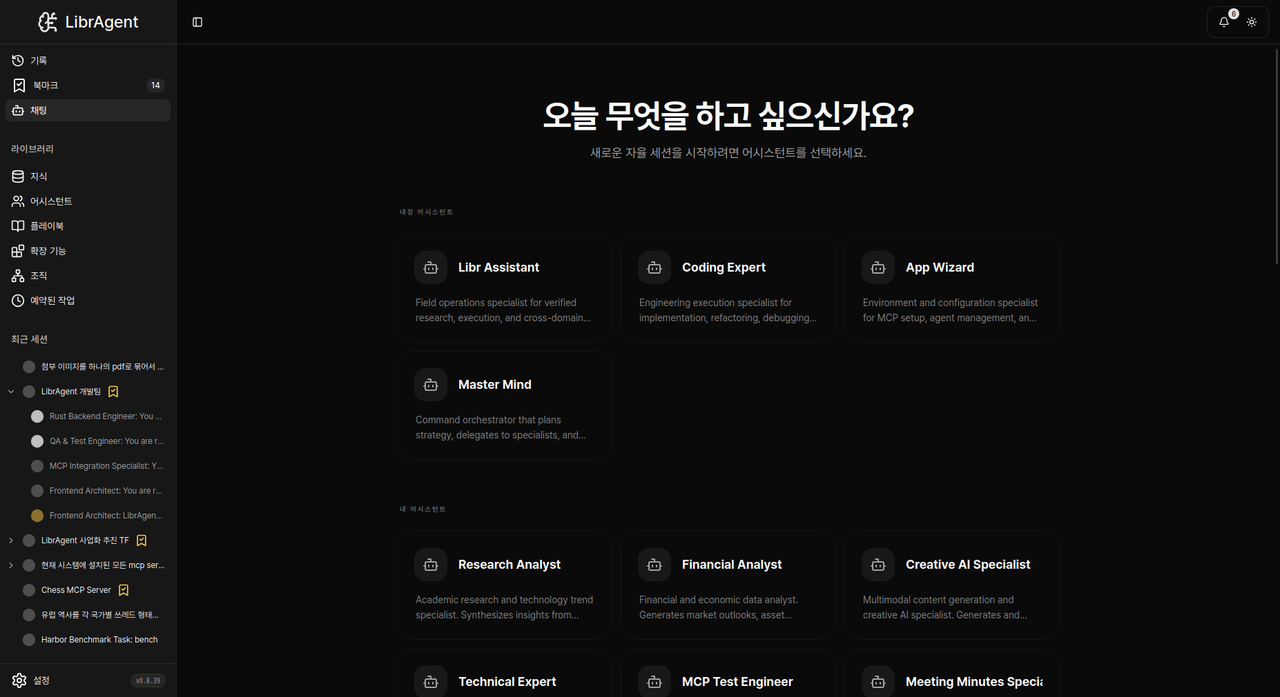
2. Start a new session
- Click a Built-in or My Assistants card.
- Draft header title: New Session.
- Type a prompt and Send.
Find Python files in this folder that lack tests.There is no sidebar 「+ New Session」 starter.

Provider / Model
Use the Provider / Model pickers (and Refresh models). Defaults come from Settings Default LLM. See Connecting models.
What is an assistant?
- System prompt (role / behavior)
- Allowed builtin tools
- Optional external MCP servers
Create customs via + Manage Assistants / Create New Assistant.
3. App Wizard and setup-wizard
App Wizard
Built-in Assistants → App Wizard helps with environment, MCP, and agent setup.
Check whether Python, Node, and uv are available; if not, give an install guide.
How do I attach a filesystem MCP server?
setup-wizard (alias bootstrap)
Builtin service setup-wizard. bootstrap in docs is the same alias.
- Detect platform
- Guide missing runtimes
Run App Wizard once before heavy coding sessions.
4. Chatting
@ mentions
| Example | Meaning |
|---|---|
@skill:docx | Insert skill procedure into context |
@skill:setup-wizard | Runtime install skill |
Catalog: Skills.
Reading replies
- Thinking — internal plan
- Tool calls — Browser / Workspace / Terminal / setup-wizard, …
- Final answer — what you read as the response
5. History
- Recent sessions: Chat / sidebar list
- Search: History
- Bookmark / delete on the session card (delete is permanent)
6. Shortcuts (reference)
Shortcuts may vary by app/OS and focus. They may not work while the input box has focus.
| Action | Common shortcut |
|---|---|
| Send message | Enter |
| New line | Shift+Enter |
Done
| Next | Doc |
|---|---|
| API keys / Default LLM | Connecting models |
| Quick path | 5-minute tutorial |
| Skills | Skills |
| Fixes | Troubleshooting |