
Connecting models
Set API keys and default models under Settings → AI & Models.
What you will learn
- How to open Settings
- Paste keys under Provider API Keys
- Choose Default LLM / Fallback LLM
- Add custom OpenAI-compatible providers
- What to check when requests fail
1. Open Settings
Sidebar → Settings. The Settings page stays open until you close it.
Top actions: Discard · Close · Save Changes
Real tab names
| Tab | Purpose |
|---|---|
| General | Language and basic app settings |
| AI & Models | API keys, default/fallback model, temperature |
| Chat Interface | Chat UI / context options |
| System | System process and permission options |
| Advanced | Advanced options |
| Experimental | Experimental features |
| Dev | Developer tools (debug builds) |
Skills are managed under sidebar Extensions, not Settings.
Names that do not exist: 「LLM Provider」 section, Settings only as a top-right gear.
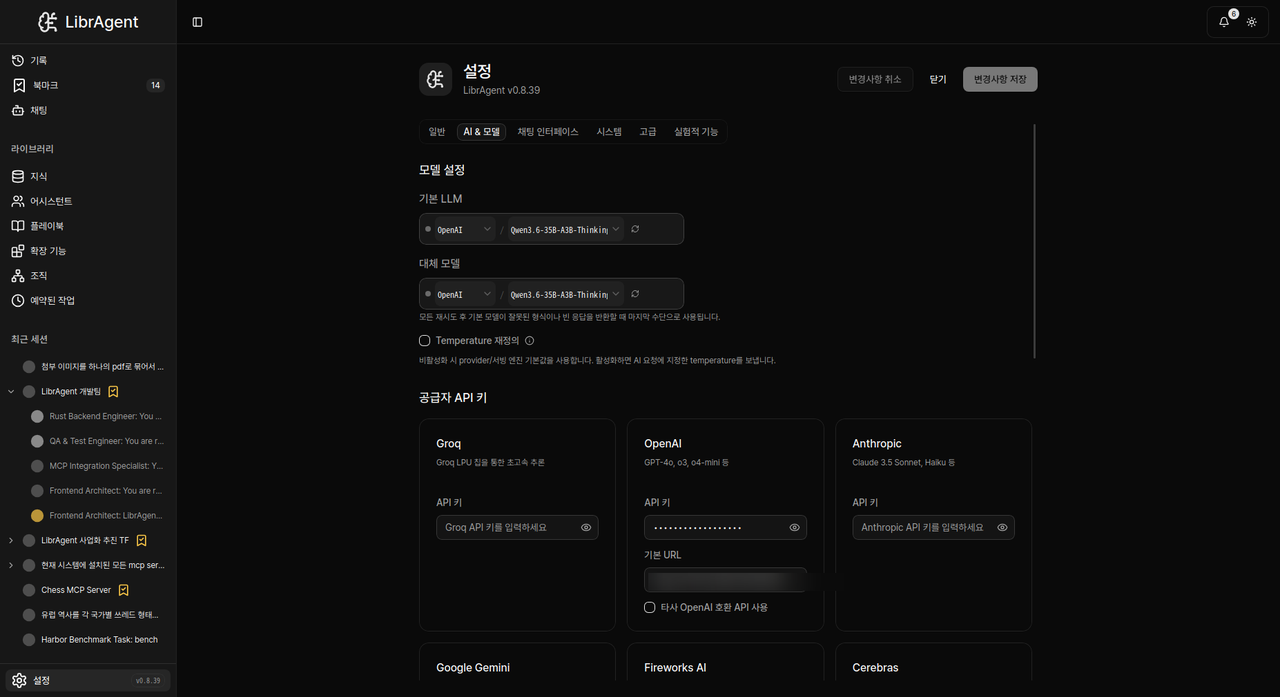
2. Provider API Keys
- Open AI & Models.
- Under Provider API Keys, pick a card (OpenAI, Anthropic, Google Gemini, Ollama, Groq, Fireworks AI, Cerebras, OpenRouter, …).
- Paste API Key (some cards also have Base URL).
- Click Save Changes.
Keys are stored locally. Never paste keys into chat.
Where to get keys
| Provider | Portal |
|---|---|
| Anthropic | console.anthropic.com |
| OpenAI | platform.openai.com/api-keys |
| Google Gemini | aistudio.google.com |
| Groq | console.groq.com/keys |
3. Model Preferences
Same AI & Models tab:
| Field | Meaning |
|---|---|
| Default LLM | Default provider/model for new sessions (with grouped provider picker) |
| Fallback LLM | Used when the default fails |
| Thinking Effort | Model reasoning effort (None, Low, Medium, High) |
| Temperature | How creative vs precise replies feel (slider, typically 0.0–2.0) |
You can also change the Model and inline Thinking Effort in the Chat input bar for the current session only.
4. Custom OpenAI providers
For OpenRouter, Ollama, etc., use Custom OpenAI Providers → Add Custom OpenAI Provider.
OpenRouter example:
| Field | Example |
|---|---|
| Display name | OpenRouter |
| Base URL | https://openrouter.ai/api/v1 |
| API Key | your OpenRouter key |
Ollama example:
| Field | Example |
|---|---|
| Base URL | http://localhost:11434/v1 |
| API Key | empty or ollama |
Local servers must already be running.
5. Troubleshooting
| Symptom | Check |
|---|---|
| Requests fail | Key / Base URL under Provider API Keys, and Save Changes |
| Empty model list | Save key, then Refresh models in the picker |
| Switch provider | Add key on that card, change Default LLM |
| Python/Node runtime | Not Settings — Chat → App Wizard + setup-wizard |
There is no Settings “connected / verifying” badge. Send a Chat message to verify.
More: Troubleshooting