
Installing MCP Servers with Extensions
Manage external Model Context Protocol (MCP) tools from the Extensions page in the sidebar.
Use Recommended Extensions to install pre-configured presets with a single click.
There is no "MCP Servers" tab in the Settings view. Manage all MCP extensions through the dedicated Extensions screen.
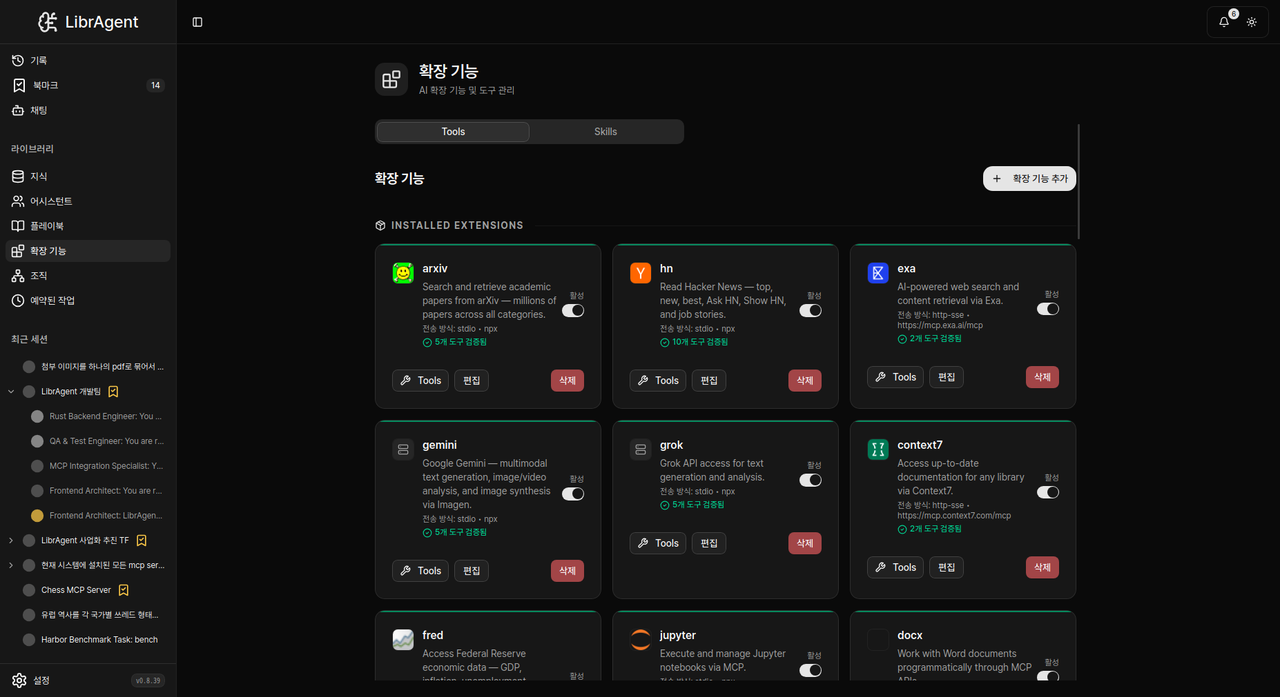
The Extensions Screen Layout
Open Extensions from the sidebar navigation.
Top Tabs:
- Tools — Install, enable, disable, and configure MCP servers.
- Skills — Manage skill directories and custom procedures (Skills Guide).
Within the Tools Tab:
- Installed Extensions — Currently registered MCP servers.
- Recommended Extensions — Bundled presets for popular services.
- Add Extension — Register custom MCP servers manually (Custom MCP Guide).
Install with Recommended Extensions
- Open Extensions → Tools.
- Select an item under Recommended Extensions.
- Fill in required parameters (such as API keys) if prompted.
- Click Save to register the server.
- Ensure the extension status toggle is set to Active.
If execution runtimes (npx, node, uv, or python) are missing, set up your system with the App Wizard or invoke @skill:setup-wizard.
Some presets use stdio (local processes), while others use HTTP/SSE (remote endpoints). The registration form populates required arguments automatically.
Recommended Extensions Catalog
These are the presets bundled with the app. Always check the Recommended Extensions UI for the latest items.
Search
- arxiv — Search academic papers on arXiv.
- brave-search — Web search using Brave Search API (requires API key).
- ddg-search — DuckDuckGo web search.
- exa — Exa semantic search engine (HTTP).
- hn — Query Hacker News stories and comments.
DevTools
- github — GitHub repository, issue, and pull request integration (HTTP).
- context7 — Up-to-date documentation lookup for open-source libraries (HTTP).
- serena — Semantic symbol-level code comprehension and editing.
- jules — Google Jules coding agent integration.
AI Providers
- openai / gemini / grok / huggingface — Direct provider MCP endpoints.
Data & Finance
- yahoo-finance — Market prices, tickers, and financial statements.
- fred — Federal Reserve Economic Data.
Documents
- docx — Word document processing via MCP API.
- jupyter — Jupyter notebook execution and inspection.
Messaging
- slack — Slack workspace integration (HTTP).
- telegram — Telegram messaging client.
Creative
- comfyui — ComfyUI generative image workflow execution.
TIP
For private packages, internal commands, or settings from other editors, see Installing Custom MCP Servers.
Verification After Installation
- Confirm that the server appears in Installed Extensions.
- Verify that the server toggle is Active.
- Check the tool count and health indicator on the server card.
- Open Assistants and verify that your target assistant has permission to use this MCP server.
Reload your session or start a new conversation to load the new tools. If discovery fails due to slow network responses, increase the timeout under Settings → Advanced → MCP Discovery Timeout.
Related Documentation
- Installing Custom MCP Servers — Manual registration and configuration imports
- Skills Guide — Procedural prompt workflows
- Troubleshooting Guide — Diagnose connection failures